Downloads

VrilXor — Community Driven Firewall-Level IP Blocking for Your Servers

Block Attackers with the First Community-Driven, Autonomous Firewall – Powered by Global Intel and Local Control.

VrilXor: firewall-level IP blocking with your lists + Vrilsoft threat intel. Web UI, CLI, API. Paranoid or Lockdown modes. apt install, VrilOne bound, auto-updates.

VrilXor sits directly on your server and manages IP blocking at the firewall layer—not in some remote dashboard, not in a proxy, but right where it matters. It combines your own deny and allow lists with a shared blocklist from VrilsoftApi, plus optional public threat feeds including Emerging Threats, CINS Army, Spamhaus DROP, DShield, and more. A background daemon keeps rules applied, ensuring protection remains active even after reboots. You can work from a browser dashboard, a local REST API, or the command line—report an IP, look one up, check status, or flip protection modes. It plays nicely with UFW, iptables, and nftables in integrate mode, or can take sole control when you want it to.


When you need a harder stance, Paranoid mode default-denies all inbound traffic except what you explicitly allow, plus an emergency access port. Lockdown goes further: almost nothing in or out except that emergency path, until you lift it. Install with apt from Vrilsoft, bind it to your VrilOne account with your API key, and it keeps itself updated via signed release metadata. Built for operators who want real blocking on the box—not just another dashboard that watches from afar. Blocks bad IPs locally, shares threat intel, and puts you in full control. Protect this server—install VrilXor today.

VrilXor is a lightweight yet powerful daemon that sits directly on your server and manages IP blocking at the firewall layer—not in some remote dashboard, not in a proxy, but right where it counts. It combines your own deny and allow lists with a shared blocklist from VrilsoftApi, plus optional public threat feeds like Emerging Threats, CINS Army, Spamhaus DROP, and DShield, giving you a multi-layered defence against malicious traffic. A background daemon ensures rules are persistently applied, surviving reboots and configuration changes. 

You retain full control through a browser dashboard, a local REST API, or the command line—report an IP, look one up, check status, or flip protection modes. It integrates seamlessly with UFW, iptables, and nftables, or can take sole control when you need absolute authority. For incident response, Paranoid mode default-denies all inbound traffic except what you explicitly allow (plus an emergency access port), while Lockdown goes even further by blocking almost everything in and out until you lift it. 


Installation is straightforward via apt from Vrilsoft, and binding it to your VrilOne account with your API key enables auto-updates through signed release metadata. Built for operators who want real blocking on the box—not just another dashboard that watches from afar—VrilXor puts you firmly in control of your server's security.

Install Instructions

How To Install VrilXor

How To Install VrilXor

# 1. Accept the EULA
sudo mkdir -p /etc/vrilxor
echo 'I ACCEPT' | sudo tee /etc/vrilxor/eula-accepted
# 2. Add Vrilsoft apt repository
curl -fsSL https://apt.vrilsoft.com/vrilsoft-apt.gpg | sudo gpg --dearmor -o /usr/share/keyrings/vrilsoft-apt.gpg
echo 'deb [arch=amd64 signed-by=/usr/share/keyrings/vrilsoft-apt.gpg] https://apt.vrilsoft.com stable main' | sudo tee /etc/apt/sources.list.d/vrilsoft.list
sudo apt update
# 3. Install VrilXor
sudo apt install -y vrilxor
# 4. Verify it's running
systemctl status vrilxor vrilxor-web --no-pager
curl -sS http://127.0.0.1:5088/health
# Or your remote IP Address over SSL : 
curl -sS https://yourserverip:5088

VrilXor CLI Instructions

How to Use VrilXor

How to Use VrilXor

VrilXor CLI

Invoke: vrilxor <command> (binary /usr/bin/vrilxor/opt/vrilxor/cli/VrilXor.Cli)

vrilxor --help

vrilxor --version

vrilxor <command> --help

Blocklist

vrilxor vrilreport 203.0.113.10:deny:ssh brute force # central + local deny

vrilxor vriladd 198.51.100.7:deny:local only # local deny only

vrilxor vrilremove 203.0.113.10

vrilxor vrillook 203.0.113

vrilxor vriloverride add 198.51.100.50 whitelist

vrilxor vriloverride add 203.0.113.99 blacklist

vrilxor vriloverride remove 203.0.113.99


Status / sync / logging

vrilxor vrilstatus

vrilxor vrilautopilot on|off

vrilxor vrillog on|off

Firewall mode

vrilxor vrilmode integrate

sudo vrilxor vrilmode sole # interactive confirm

Paranoid / Power Down / Lockdown

sudo vrilxor paranoid off|powerdown|watchful|paranoid|lockdown

# shortcut:

sudo vrilxor-paranoid off

Traffic

vrilxor traffic

vrilxor traffic --interval 5 --rows 40

vrilxor traffic --once

Updates

vrilxor update --check

vrilxor update --apply

# shortcut:

vrilxor-update --apply


Example of running vrilxor traffic with params :

┌─VrilXor · Live Traffic───────────────────────────────────────────────────────┐             

│ Mode Watchful Emergency :5088 2026-08-06 00:06:19Z · tick 59 · Ctrl+C quit │             

└──────────────────────────────────────────────────────────────────────────────┘             

╭─────────────┬─────────────┬───────────┬───────────────────────╮                    

│ BLOCKED/min │ ALLOWED/min │ THREATS  │ TODAY / SCORE     │                    

│ 125     │ 7,053    │ 24 unique │ 370 · 69 (1.7% block) │                    

╰─────────────┴─────────────┴───────────┴───────────────────────╯                    

      Top sources (15 min)                        Hot ports        


 Source IP    Hits  Blocked  Allowed                  Port  Hits       

─────────────────────────────────────────────                ────────────────      

 85.217.*.*   25    25     0                  8107   20       

 85.217.*.*   21    21     0                  9686   20       

 85.217.*.*   21    21     0                  53388   19       

 85.217.*.*   20    20     0                  18287   19       

 47.250.*.*   20    20     0                  16056   19       

 8.211.*.*   20    20     0                  8689   19       

 69.5.*.*    19    19     0                  59115   19       

 85.217.*.*   19    19     0                  12476   18       


                        Live feed                         


 UTC        Source             Port     Proto    Action       Hits  

━━━━━━━━━━━━━━━━━━━━━━━━━━━━━━━━━━━━━━━━━━━━━━━━━━━━━━━━━━━━━━━━━━━━━━━━━━━━━━━━━━━━━━━━━━━━━━━━━━━━━━━━

 00:06:19      85.217.*.*          15884    tcp     BLOCKED        7  

 00:06:19      195.184.*.*         20057    tcp     ALLOWED        7  

 00:06:18      194.180.*.*        46892    tcp     ALLOWED        8  

 00:06:18      85.217.*.*          9093     tcp     BLOCKED        9  

 00:06:18      79.124.*.*         8631     tcp     BLOCKED        9  

 00:06:18      80.233.*.*          443     tcp     ALLOWED       399  

 00:06:18      8.216.*.*          8858     tcp     ALLOWED        9  

 00:06:18      194.180.*.*         46705    tcp     ALLOWED        9  

 00:06:18      85.217.*.*          58006    tcp     ALLOWED       11  

 00:06:18      91.230.*.*          42443    tcp     ALLOWED       12  

 00:06:18      194.180.*.*         40321    tcp     ALLOWED       12  

 00:06:18      78.128.*.*        60876    tcp     ALLOWED       12  

 00:06:18      194.180.*.*         29128    tcp     ALLOWED       12  


Vril Shield AV (CLI)

vrilxor hostscan start --mode malware Queue a malware scan (also: --mode virus | --mode full; default full)

vrilxor hostscan status Show live job status, engine/signatures, and threats

vrilxor hostscan cancel Request stop of a running scan

vrilxor hostscan clear-queue Clear a stuck queue (alias: clear)

vrilxor hostscan process Process pending jobs in-process (tooling/debug)

vrilxor hostscan quarantine List quarantined files

vrilxor hostscan refresh Queue a threat-definition refresh


VrilXor Now Ships With Vrilsoft's New AntiVirus powered by the Vril Shield Engine

VrilXor’s new antivirus arrives as Host Scan, powered by the Vril Shield Engine. It sits alongside VrilXor’s firewall and IP blocking, so you are not only stopping hostile traffic at the edge—you can also inspect what is already on the disk. Definitions refresh from the Threat DB, and the Web UI and CLI both surface live progress: phase, percent, current path, and threat count while a scan runs.


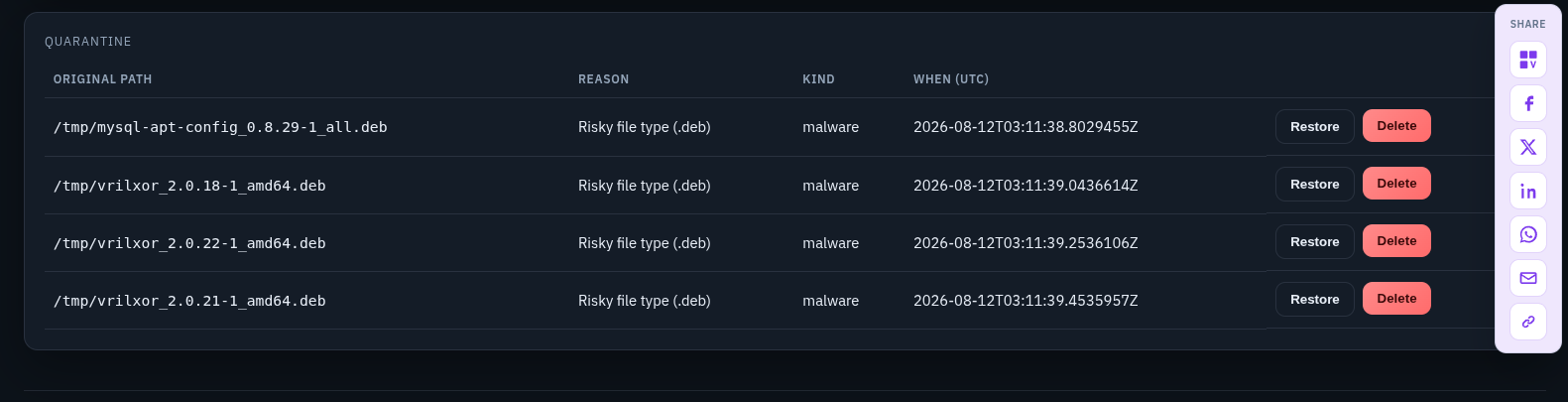
You can start a malware scan, a virus scan, or a full pass, then cancel or clear the queue if a job stalls. Scans are queued for the daemon and executed with the privileges needed to walk the host filesystem, while the UI stays responsive with live job type, mode, and cancel state. Findings land in a Threats list with path, reason, and kind so you can act without digging through raw logs.

Closing Remarks On Quarantine Of Suspect Files That Just Look Out Of Place

Closing Remarks On Quarantine Of Suspect Files That Just Look Out Of Place

When something looks wrong, quarantine is available to isolate files and restore or delete them later. Auto-quarantine stays off by default so a noisy hit does not silently move production assets; you stay in control. False positives can be whitelisted from the Threats table, drop out of live status immediately, and live in a managed whitelist you can remove when you change your mind.


Together, Vril Shield turns VrilXor from a network blocker into a fuller host defense: signature- and heuristic-aware scanning, operator-friendly controls, and a clear path from detection to quarantine or whitelist—built for servers that already trust VrilXor at the firewall.

Downloads

vrilxor_2.0.25-1_amd64.deb
114.31 MB · Ready to download
SHA-256 23b6e0061a24ed519a4676eadc2ad422908e085f54d877cc6233f9264476809e

Get in touch