Downloads
  • vrilops_1.0.0_amd64.deb 74.41 MB
    SHA-256 a13929511d1acb72079b4eb9d7e3106ce11b146e56d09eb1261b84a88179d6de
  • VrilOps-1.0.0-win.zip 111.5 MB
    SHA-256 4e44151a6c56e2b4fa2ab8c6ff0b518f815a83be8a232be6443207f544f59487
  • Vril Hum-Setup-1.0.0.exe 81.17 MB
    SHA-256 9e72e9251afb30638930a46cbec843f1172405b4d3d92f2847f657ed51ed38ca

VrilOps Deployment Manager

Install VrilOps — the PIN-gated desktop deployment manager for build, SCP/RSYNC deploy, and systemd control over SSH. Free for Linux (apt) and Windows.

€0.00

Select a plan below
View cart

Install VrilOps — and what you’re actually getting

VrilOps is not another CI dashboard in the cloud. It is a local desktop desk for deployments: your projects, your servers, your builds, and your transfers — sealed behind a PIN vault on the machine you control.

Think of it as the flight checklist for shipping to a VPS. Configure once. Re-run forever.

This guide covers Linux install via apt (the same signed repository as Vril Hum and VrilXor), Windows install, then a clear tour of the workflow so you know what you opened.


Install on Linux (apt)

Package name: vrilops

Repository: apt.vrilsoft.com (signed, amd64)

One-time setup + install

curl -fsSL https://apt.vrilsoft.com/vrilsoft-apt.gpg | sudo gpg --dearmor -o /usr/share/keyrings/vrilsoft-apt.gpg

echo 'deb [arch=amd64 signed-by=/usr/share/keyrings/vrilsoft-apt.gpg] https://apt.vrilsoft.com stable main' \

| sudo tee /etc/apt/sources.list.d/vrilsoft.list

sudo apt update

sudo apt install -y vrilops


If you already use apt for Vril Hum or VrilXor, you only need the last two lines — the repo is the same.

Upgrade later

sudo apt update && sudo apt install --only-upgrade vrilops

Prefer a direct download? Grab the .deb from the linked publication (SHA-256 is shown so you can verify the file):

sudo apt install ./vrilops_*.deb


Install on Windows

Download the Windows installer from this product page (or the publication Downloads section when attached), run it, then launch VrilOps from the Start menu.

First launch — PIN vault

Create a PIN on first launch (minimum 4 characters). That PIN unlocks the encrypted project vault for the session. SSH passwords and project metadata stay on this machine — they are not baked into the installer and are not uploaded to Vrilsoft.

Change PIN anytime from Help → Change PIN.


The workflow

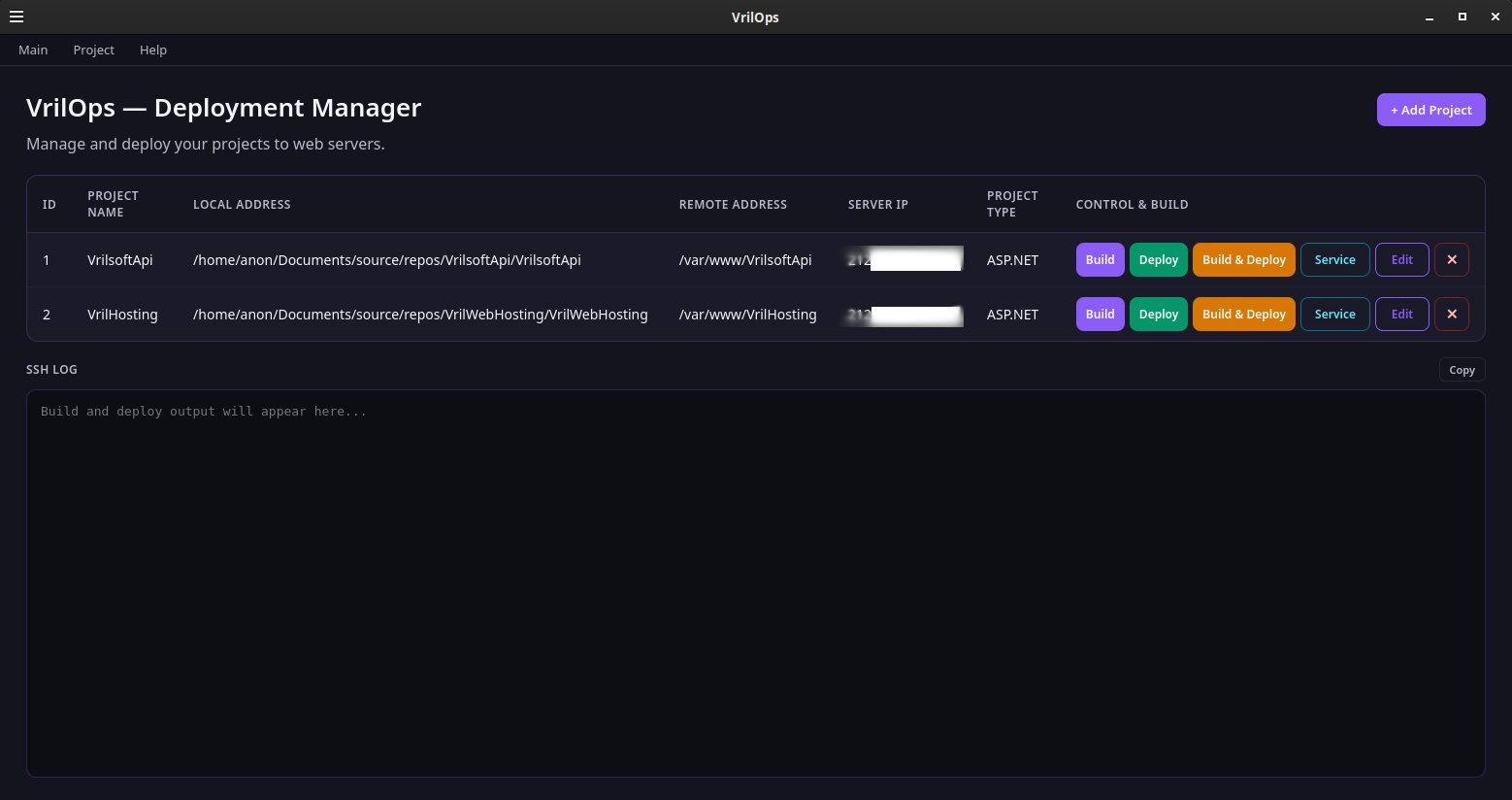
  1. Add Project — local folder, remote path, server IP/port, project type, SCP or RSYNC, SSH user/password, optional custom build options, optional systemd service path + sleep.
  2. Build — clears contents of the sibling ../deploy folder (folder itself always remains), then runs the type-specific build.
  3. Deploy — transfers deploy/ to the remote path; if a service is set, stop → sleep → transfer → sleep → start.
  4. Build & Deploy — build first; deploy only if build succeeds.
  5. Service — visible when a service path exists; checks active state and toggles start/stop.

Watch everything in the read-only SSH LOG (copy supported). Passwords are redacted.

Transfer methods

  • SCP — classic secure copy. Optional flags are filtered so RSYNC-only options (like -avz --delete) cannot slip in and break the command.
  • RSYNC — default -avz --delete when options are left blank, so remote contents stay in sync with your publish folder.


How the pieces fit

VrilOps (desktop)

├── PIN vault (projects + SSH secrets, local)

├── Project list (Build / Deploy / Build & Deploy / Edit / Service)

├── Build → ../deploy (contents only)

├── Deploy → SCP or RSYNC over SSH (sshpass)

└── Optional systemd stop/start around transfer

Quick checklist after install

  1. Install or upgrade vrilops via apt, or run the Windows installer.
  2. Set your vault PIN.
  3. Add a project (browse local folder, fill remote + SSH).
  4. Optional: Service File Path for systemd-aware deploys.
  5. Build & Deploy — confirm on the server.


Need the long-form overview and Downloads list? See the publication: https://vrilsoft.com/publications/vrilops-download

Premium plans

Free

Free Plan

For free with no monthly fees.

0.00 / per month
  • 100000 API requests/month · 1 key · Lower rate limits
  • Email support · 72-hour response · Usage analytics
  • Vril Hum (desktop app with 10 internal apps)
  • Vril Vault (ad-blocker & anti-virus)
Standard

Standard

Everything in Free, plus

3.00 / per month
  • Everything in Free, plus:
  • 150000 API requests/month · Standard rate limits
  • Vril One Services: Elly nanny software (Opera/Chrome/Vril Browser)
Plus One

Plus One

Everything in Standard, plus

6.99 / per month
  • Everything in Standard, plus:
  • Sentinel One Face Guard
  • 5000000 API requests/month · Plus One rate limits
Vril One Light

Vril One Light

Everything in Plus One, plus

14.99 / per month
  • Everything in Plus One, plus:
  • 7000000 API requests/month · 48-hour response time
  • VrilXor Firewall - Local / Server firewall protection
  • VrilGuard Anti-Virus - Fight malware, viruses and PUPS
  • Unlimited premium HD watch time on Vril.TV (commercial-free shows & movies)

Details

Downloads

VrilOps Deployment Manager Download

Build, transfer, and restart services over SSH — without leaving a PIN-gated vault.

VrilOps is Vrilsoft’s desktop deployment manager for Linux and Windows. Add projects, build locally, deploy with SCP or RSYNC, and toggle systemd services — with credentials sealed in an encrypted vault. SEO title: Download VrilOps | Vrilsoft DevOps Deployment App SEO description: Download VrilOps for Linux (.deb / apt) and Windows. PIN-protected project vault, build & deploy over SSH, SCP/RSYNC, and systemd service control.

VrilOps is a free desktop application from Vrilsoft built for people who ship code to real servers. One window holds your projects, your build commands, your transfer method, and a live SSH log — with SSH passwords locked behind a PIN vault on your machine.


Stop juggling sticky notes, terminal history, and half-remembered rsync flags. Configure a project once. Hit Build, Deploy, or Build & Deploy. When a systemd unit is set, VrilOps can stop it, wait, transfer, wait, then start it again.


What VrilOps does

Project desk — name, local path, remote path, server IP/port, project type, transfer method, SSH user/password, optional custom build flags, optional service unit + sleep.

Build — clears the sibling deploy/ folder contents (never deletes the folder), then runs the command for your project type (ASP.NET, Node, React, Go, and more).

Deploy — SCP or RSYNC with optional flags; RSYNC-only options are filtered when SCP is selected so bad flags do not break the transfer.

Service control — optional systemd path; Deploy / Build & Deploy can stop → sleep → transfer → sleep → start. A Service button toggles start/stop when a unit is configured.

SSH LOG — live output with copy support. Passwords are redacted from the log.

PIN vault — first launch sets your PIN; projects and SSH secrets stay encrypted locally. Change PIN anytime from Help.

Who it’s for


Developers, hosts, and ops leads who deploy .NET, Node, and other stacks to Linux VPS boxes over SSH — and want a repeatable desktop workflow instead of reinventing the same shell one-liner every Friday night.


Free to use

VrilOps is free from Vrilsoft. Optional donations and Vrilsoft plans support the wider stack (Vril Hum, VrilXor, Vril One, and more).


Install on Linux (apt)

Package name: vrilops

Repository: apt.vrilsoft.com (signed, amd64) — the same repo as Vril Hum and VrilXor.


One-time setup + install

curl -fsSL https://apt.vrilsoft.com/vrilsoft-apt.gpg | sudo gpg --dearmor -o /usr/share/keyrings/vrilsoft-apt.gpg
echo 'deb [arch=amd64 signed-by=/usr/share/keyrings/vrilsoft-apt.gpg] https://apt.vrilsoft.com stable main' \
 | sudo tee /etc/apt/sources.list.d/vrilsoft.list
sudo apt update
sudo apt install -y vrilops

If you already use apt for Vril Hum or VrilXor, you only need:


sudo apt update
sudo apt install -y vrilops

Upgrade later

sudo apt update && sudo apt install --only-upgrade vrilops

Prefer a direct .deb? Download it from this page (SHA-256 is shown so you can verify), then:


sudo apt install ./vrilops_*.deb

Runtime note: Deploy uses sshpass for password-based SSH. The VrilOps package depends on it; if you install a portable build, run sudo apt install sshpass.

Install On Windows

Install On Windows

Install On Windows

Download the Windows installer from the product page and run it. After install, launch VrilOps, set your PIN, and add your first project.

Store / install guide: https://vrilsoft.com/products/vrilops-deployment-manager


First launch — your PIN

On first open, VrilOps asks you to create a PIN (at least 4 characters). That PIN unlocks the local vault for this session. Project rows — including SSH passwords — are stored encrypted on disk. Wrong PIN means no access to your saved projects.


Change the PIN later from Help → Change PIN.

Quick checklist after install

Install via apt (vrilops) or the Windows installer.


Set your vault PIN.

Project → Add Project (local folder, remote path, IP, type, SSH credentials).

Optional: Service File Path + Sleep for systemd stop/start around deploy.

Build → Deploy, or Build & Deploy — watch the SSH LOG.


By Vrilsoft Inc. · vrilsoft.com

Downloads

vrilops_1.0.0_amd64.deb
74.41 MB · Ready to download
SHA-256 a13929511d1acb72079b4eb9d7e3106ce11b146e56d09eb1261b84a88179d6de
VrilOps-1.0.0-win.zip
111.5 MB · Ready to download
SHA-256 4e44151a6c56e2b4fa2ab8c6ff0b518f815a83be8a232be6443207f544f59487
Vril Hum-Setup-1.0.0.exe
81.17 MB · Ready to download
SHA-256 9e72e9251afb30638930a46cbec843f1172405b4d3d92f2847f657ed51ed38ca

Get in touch