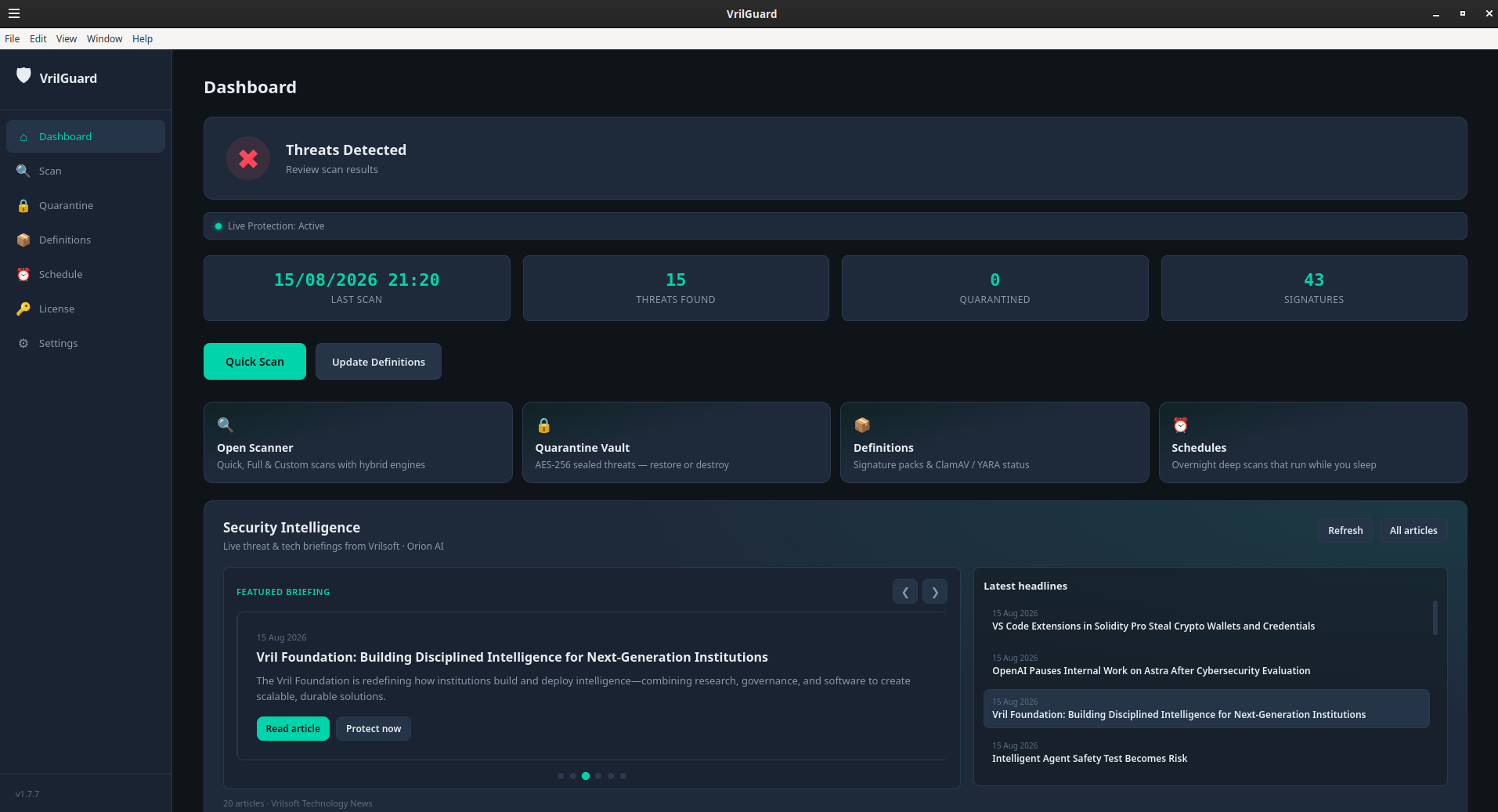
Install VrilGuard — and what you’re actually getting
Most “antivirus” products either slow your desktop into molasses or hide every decision behind a marketing cloud. VrilGuard is the opposite: a focused Vrilsoft desktop shield with a hybrid engine, clear scan modes, encrypted quarantine, and licensing you already understand if you use Vril One.
This page is the install and product guide. Downloads (Linux AppImage / .deb, Windows Setup / portable zip) sit above with SHA-256 on each file. Licensing and plans live on VrilsoftApi.
Why VrilGuard
Hybrid detection — Vril Shield signatures plus ClamAV / YARA where available, so you see which engine attributed a hit.
Honest trial — fourteen days of Quick Scan to evaluate on your Downloads folder before you commit.
Premium that means something — Full system scans, custom folder targets, and Live Protection when your product key is active.
AES quarantine — sealed threats stay sealed until you choose restore or delete.
Same ecosystem — activate with a vrilguard key from My API Manager; definitions and entitlement refresh from VrilsoftApi.
Who it’s for
Linux desktop users (AppImage / .deb) and Windows users (Setup installer or portable zip) who want Vrilsoft-grade protection without bolting five tools together — and teams already on Plus One, Light, Platinum, or Premium who want antivirus under the same product-key model as VrilXor and Vril Hum.
Install on Linux
AppImage — download from the Downloads section above, then:
chmod +x VrilGuard-*.AppImage
./VrilGuard-*.AppImage
.deb package — download vrilguard_*.deb, then:
sudo apt install ./vrilguard_*.deb
After install, launch VrilGuard from your app menu (or run the AppImage again).
Install on Windows
Setup installer — download VrilGuard Setup *.exe, run it, then launch VrilGuard from the Start menu.
Portable zip — download VrilGuard-*-win-x64.zip, extract it somewhere you control, and run VrilGuard *.exe inside the folder. No installer required.
License, trial, and Premium
1. Open License in the app (trial countdown starts on first run).
2. Create a vrilguard product key in My API Manager on an eligible Vril One plan.
3. Paste the key in-app and activate — you’ll see your plan name and a partial key fingerprint (never the full secret).
4. Update Definitions, run Full Scan, and turn on Live Protection.
Plans: vrilsoftapi.com/Public/VrilGuard/Plans
Publication / downloads: VrilGuard Anti-Virus Download For 2026-2027
What Premium unlocks
Full Scan — across common system and user paths.
Custom folder selection — point scans at the trees you care about.
Live Protection — real-time monitoring of Downloads and high-risk paths.
Ongoing entitlement — license validation against your VrilsoftApi product key.
Without Premium you still get a clear fourteen-day Quick Scan trial so you can judge the product on your own Downloads folder.
How the pieces fit
VrilGuard (desktop)
├── Hybrid engines (Vril Shield + ClamAV / YARA when present)
├── Quick / Full / Custom scans
├── AES quarantine (restore or delete)
├── Live Protection + schedule (Premium)
├── Definitions refresh ← VrilsoftApi
└── License vault ← vrilguard product key
Quick checklist after install
1. Install from Downloads above (Linux AppImage/.deb or Windows Setup/zip).
2. Update Definitions.
3. Activate Premium — or finish evaluating Quick Scan on trial.
4. Enable Live Protection + auto-quarantine (Premium).
5. Schedule recurring scans if you want hands-off coverage.
Vrilsoft Inc. — security software that stays on your side of the keyboard.